Logging into XNAT
Follow the steps below to sign in to XNAT.
-
Go to https://xnat.monash.edu
-
Click Sign In.
-
From the sign-in options, select your organisation or AAF. If no option applies to you, email merc-xnat-support@monash.edu with your email address, first name, and last name. An XNAT administrator will provide you with further instructions.
-
Enter your institutional credentials and sign in.
-
If you are signing in for the first time, you may see the below prompt, select the highlighted button and click Register:
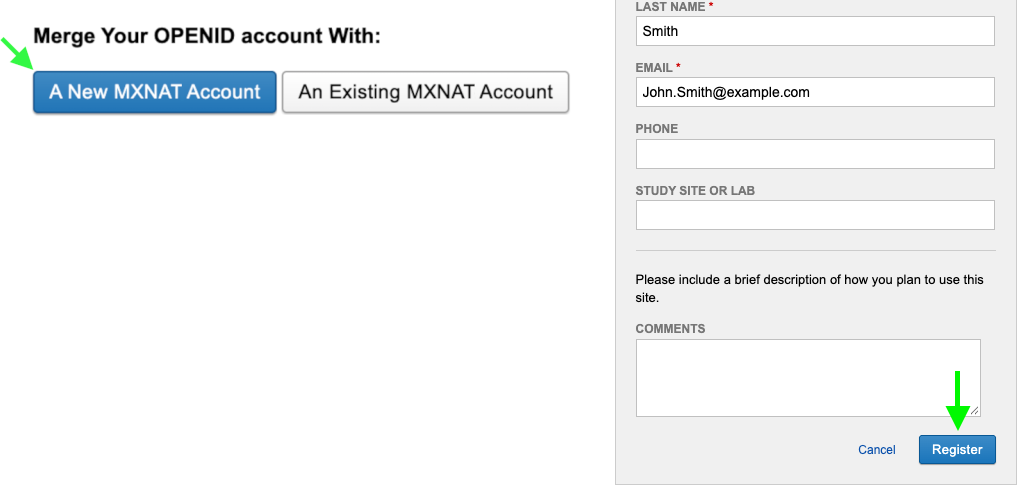
- An administrator will review your request and contact you with further information.
Monash Guest accounts
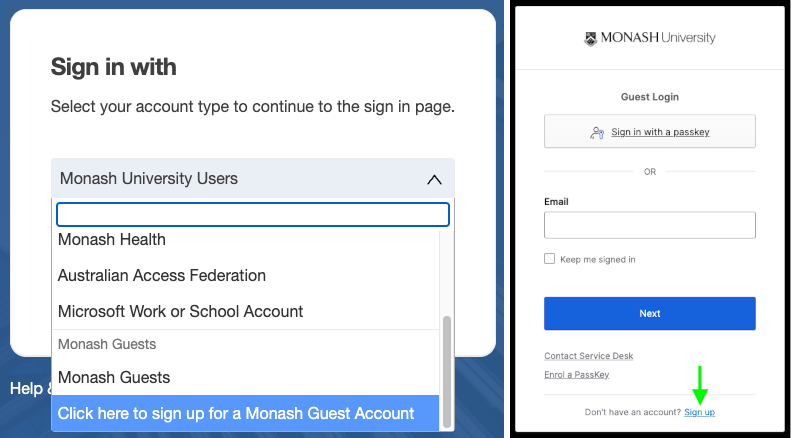
If you do not have access through an organisation or AAF, you can request a Monash Guest account.
- On the Monash sign-in page, scroll down to Click here to sign up for a Monash Guest Account:
-
You only need to complete the guest account sign-up process once.
-
If you are signing in for the first time, you may see the below prompt, select the highlighted button and click Register:
- An administrator will review your request and contact you with further information.